
The Ultimate Guide to UI vs UX: What’s the Real Difference?
If you have spent more than five minutes researching how to build an app, design a website, or get into the tech industry, you have definitely seen the term “UI/UX.” People toss these letters around together like they are the exact same thing. You’ll see job postings for “UI/UX Designers” and agencies promising “Expert UI/UX Services.” Because they are always mashed together with a slash, it is incredibly easy to assume they are just two different names for designing a screen.
But here is the truth: they are completely different disciplines.
When it comes to UI vs UX, understanding the difference isn’t just tech trivia. Whether you are a business owner trying to increase your sales, a beginner looking to start a design career, or just a curious creative, knowing how these two elements work separately—and together—is the secret to creating digital products people actually want to use. So, grab a cup of coffee. We are going to strip away all the confusing tech jargon and break down exactly what UI and UX mean, how they differ, and why they are the absolute backbone of the digital world.

Let’s start with the “UX” half of the UI vs UX debate. UX stands for User Experience.
Coined in the 1990s by Don Norman, a cognitive scientist working at Apple, User Experience is exactly what it sounds like: it is the overall experience, feeling, and journey a person has when they interact with a product.
While we usually talk about UX in the digital realm (apps and websites), it applies to the physical world, too. Have you ever bought a fancy coffee maker but couldn’t figure out how to program it because the buttons made no sense? That is a terrible user experience. On the flip side, think about peeling a banana. It comes in its own biodegradable wrapper, tells you exactly when it’s ripe by changing color, and is incredibly easy to open. That is perfect, natural UX. In the digital world, UX design is the logical, analytical, and psychological process of making an app or website as easy, intuitive, and frictionless as possible. A UX designer is the ultimate advocate for the customer. They don’t care what color the buttons are yet. They care about where the buttons are, and why they are there.
What does a UX Designer actually do?
-
User Research: They talk to real people. They send out surveys, conduct interviews, and study data to figure out what the target audience actually wants and needs.
-
Information Architecture: This is a fancy term for organizing content. A UX designer figures out how to structure a website so that a user can find what they are looking for in three clicks or less.
-
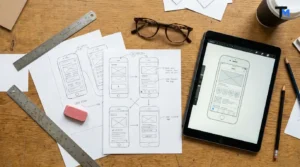
Wireframing: UX designers create the blueprint. They draw basic, black-and-white, blocky outlines of screens to map out the journey from Point A to Point B.
-
User Testing: They put their ugly wireframes in front of real people and watch them use it. If the user gets confused or lost, the UX designer goes back and fixes the logic.
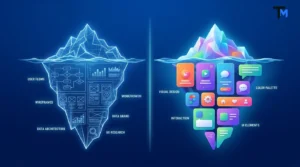
UX is the brain, the skeleton, and the foundation of a digital product. It is all about function.
What is UI (User Interface)?
Now, let’s look at the “UI” side of the UI vs UX equation. UI stands for User Interface.
If UX is the skeleton and the brain, UI is the skin, the makeup, and the stylish outfit. User Interface design is strictly digital. It encompasses absolutely everything that a user’s eye sees, touches, clicks, or swipes on a screen. The goal of UI design is to make the user’s interaction as aesthetically pleasing, visually stimulating, and on-brand as possible. It is where art meets technology.
While a UX designer will say, “We need a checkout button right here in the middle of the screen so people don’t miss it,” the UI designer steps in and says, “Great. I’m going to make that button a soft, inviting shade of green. I’m going to give it slightly rounded corners so it looks friendly, add a tiny drop shadow so it looks clickable, and when you tap it, a little checkmark is going to bounce onto the screen.”
What does a UI Designer actually do?
-
Visual Design: They establish the entire mood of the app. A banking app needs to look secure, solid, and trustworthy (think deep blues and crisp whites). A meditation app needs to feel calming (think soft pastels and gradients).
-
Typography: They choose the fonts and text sizes. This isn’t just about looking pretty; it’s about readability and guiding the user’s eye to the most important information first.
-
Interactive Elements: They design the sliders, the toggle switches, the drop-down menus, and the forms.
-
Micro-interactions: Have you ever “liked” a post on Instagram and seen that little red heart animation pop up? That is UI design. Those tiny animations make the app feel alive and rewarding.
UI is the beauty, the vibe, and the visual bridge that connects the human to the computer.
UI vs UX: The Best Analogies to Tell Them Apart
Because these two roles work so intimately together, the lines often blur. When exploring the UI vs UX dynamic, the easiest way to wrap your head around the differences is through a few real-world analogies.
1. The Restaurant Analogy
Imagine going to a highly-rated restaurant.
-
The UX is the service. It’s how easy it was to book a table, how quickly the waiter took your order, the logical flow of the menu from appetizers to desserts, and the fact that your food arrived hot.
-
The UI is the ambiance. It’s the dim, romantic lighting, the comfortable velvet chairs, the beautiful typography on the physical menu, and the gorgeous way the chef plated your food.
-
The Result: If the food looks amazing (Great UI) but takes two hours to arrive and the waiter is rude (Bad UX), you won’t go back. If the service is blazing fast (Great UX) but the restaurant is freezing cold and smells weird (Bad UI), you also won’t go back. You need both.
2. The House Analogy
Imagine you are building your dream home.
-
The UX Designer is the architect. They decide that the dining room should be next to the kitchen so your food doesn’t get cold while carrying it. They figure out where the stairs should go and ensure the foundation won’t collapse. They care about flow.
-
The UI Designer is the interior decorator. Once the drywall is up, they step in. They pick the matte navy blue paint for the kitchen cabinets, choose the brushed brass handles, and pick the hardwood floors. They care about aesthetics.
3. Left Brain vs. Right Brain
-
UX is associated with the left side of the brain. It is logical, analytical, data-driven, and obsessed with problem-solving.
-
UI is associated with the right side of the brain. It is creative, artistic, visual, and obsessed with aesthetics.
Why “UI vs UX” is Actually “UI + UX” (The Inseparable Duo)
Even though we are comparing UI vs UX, pitting them against each other is actually a bit misleading. In reality, they are completely inseparable. They are best friends. You cannot have a highly successful digital product if one of them is failing.
Let’s look at what happens when there is an imbalance.
Scenario A: Brilliant UX, Terrible UI
Imagine a banking app where the logic is absolutely flawless. You can find your account balance in one second, transferring money is a breeze, and the user journey is mapped to perfection. However, the app looks like it was built in 1998. The text is neon yellow on a red background, the buttons are jagged, and the fonts are microscopic.
The result? The app works, but users won’t trust it with their money because it looks cheap and unprofessional.
Scenario B: Stunning UI, Terrible UX
Now imagine an e-commerce website that looks like an absolute masterpiece. It features award-winning photography, stunning color gradients, and gorgeous animations when you scroll. But when you try to actually buy a shirt, you can’t figure out where the shopping cart went. When you finally find it, the checkout form has 25 mandatory fields, and the site crashes if you type your phone number wrong.
The result? The user will leave out of sheer frustration, and the business will lose money.
Great design happens when the logic of UX shakes hands with the beauty of UI.
How UI and UX Work Together in the Real World
So, how does a digital product actually go from an idea in a founder’s head to a beautiful, functional app on your phone? It follows a structured lifecycle known as the Design Thinking Process.
Here is a brief, readable breakdown of how UI and UX designers tag-team a project from start to finish:
Step 1: Empathize & Research (UX)
Before drawing anything, UX designers try to understand the user. Who are they? What are their frustrations? This involves market research, competitor analysis, and creating “User Personas.”
Step 2: Define & Strategize (UX)
Based on the research, designers map out the “User Journey.” This is a step-by-step map of how a user will navigate the app to achieve their goal.
Step 3: Ideate & Wireframe (UX)
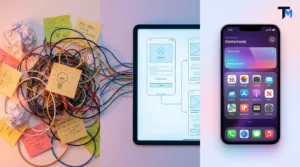
The UX designer creates low-fidelity wireframes. These are simple block-and-line drawings that establish the layout of each screen. No colors or fonts are used yet—just pure structure.
Step 4: Visual Design (UI)
Once the wireframes are approved, the UI designer takes over. They inject life into the wireframes by applying a design system—adding brand colors, beautiful typography, custom icons, and interactive elements.
Step 5: Prototyping (UI/UX)
The static screens are linked together using software like Figma. This creates a “prototype”—a dummy version of the app that you can tap and swipe through as if it were real.
Step 6: User Testing (UX)
The prototype is put in front of real users. Designers watch how they interact with it. Do they hesitate? Do they get lost? If so, the team takes notes, fixes the problems, and tests again.
Step 7: Development Handoff
Once the design is flawless, the UI/UX team hands all their files over to the software developers (coders), who write the code to bring the design to life on the internet.
Why Does This Matter for Your Business?
You might be thinking, “This sounds like a lot of work. Can’t we just hire a coder to build the website and skip the design phase?”
Skipping the UI/UX design phase is one of the most expensive mistakes a business can make. Investing in good design is no longer a luxury; it is a fundamental business requirement. Here is why:
-
It Directly Increases Sales: A well-designed, frictionless checkout process can drastically increase the percentage of visitors who actually buy your product. If it’s easy and trustworthy to buy, people will buy more.
-
It Saves Development Money: Finding and fixing a logic error during the wireframing stage takes minutes. Finding and fixing a problem after the app has been coded takes weeks of expensive developer time. Good UX prevents bad code.
-
It Builds Brand Loyalty: People fall in love with apps that make their lives easier. Think of apps like Uber, Spotify, or Airbnb—their seamless UI/UX design is a massive part of their brand identity.
-
It Lowers Support Costs: If your app is intuitive, users won’t need to bombard your customer support team to ask how to reset their password or find their order history. The design answers their questions for them.
Wrapping It Up: The Invisible Magic
At the end of the day, the absolute best design is the kind you don’t even notice.
When an app works perfectly, you don’t think about the UX architect who spent weeks mapping out your digital journey, or the UI artist who tested fourteen different shades of blue for the checkout button. You just order your food, book your flight, or text your friend without a second thought. And honestly? That’s exactly how it should be.
The UI vs UX debate isn’t about which one is better; it’s about understanding how they complete each other. UX ensures that the product is useful, logical, and solves the user’s problems. UI ensures that the product is beautiful, engaging, and a joy to look at. Together, they create digital magic.
Did you find this guide helpful in talktomir? I’m always geeking out over great design, sharing beginner-friendly tech tips, and posting my own behind-the-scenes creative projects. I’d love to connect with you!
Come say hi and let’s keep the conversation going:
-
Facebook: @talktomirr — For daily design tips, industry thoughts, and the occasional meme.
-
Instagram: @talkto_mir — A peek into my workspace, visual inspiration, and life as a creator.